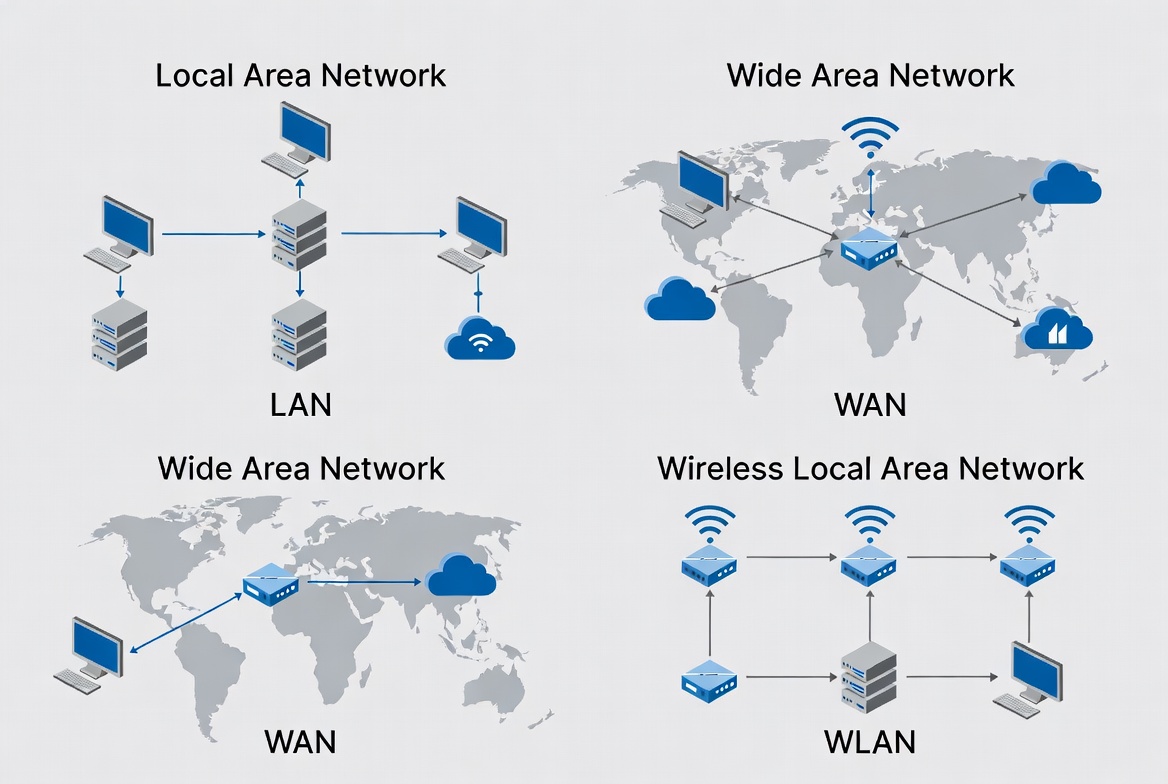
- How networks are classified by their geographical scope
- Which topologies exist and when they actually matter
- Physical vs logical networks (VLANs, subnets, overlays)
- On-prem, cloud, and hybrid networks
- Practical examples with real problems you’ll run into
1. Network types by scope
The most classic way to classify networks is by their size and geographical scope. Think of this as the map’s “zoom levels.”
1.1 PAN – Personal Area Network
A PAN is your personal connectivity bubble:
- Bluetooth between your laptop and headphones
- Smartwatch syncing with your phone
- Wireless keyboard/mouse
As a sysadmin you usually won’t manage it, but it coexists with everything else.
1.2 LAN – Local Area Network
The LAN is the classic local network:
- Covers an office, floor, house, or small shop
- High speed (1 Gbps, 10 Gbps...)
- Low latency (< 1 ms typically)
- Managed by the company’s IT/network team
1.3 WLAN – Wireless LAN
The WLAN is basically a LAN with Wi-Fi:
- Uses IEEE 802.11 standards (a/b/g/n/ac/ax...)
- Combines cabling (backbone) with access points
- Handles authentication and encryption (WPA2/WPA3, 802.1X)
1.4 CAN – Campus Area Network
A CAN links multiple LANs inside a campus:
- Several buildings in a university
- Industrial park with multiple warehouses
- Headquarters made up of separate buildings
1.5 MAN – Metropolitan Area Network
A MAN covers a city or part of it:
- Networks connecting branches in the same city
- Provider infrastructure for metropolitan dedicated links
1.6 WAN – Wide Area Network
The WAN is the long-distance network:
- Connects cities, countries, or continents
- Internet is the most well-known example
- Higher latency, more expensive links
- More dependencies on third parties (ISPs, telcos)
1.7 GAN – Global Area Network
The GAN label is used for truly global networks:
- Backbones of large international telcos
- Cloud provider networks (Google, AWS, Azure)
- Low-orbit satellite networks (Starlink, etc.)
Scope summary
| Type | Scope | Practical example | Managed by |
|---|---|---|---|
| PAN | Personal (10 m) | Headphones over Bluetooth | End user |
| LAN | Local (building) | Office network | Internal IT |
| WLAN | Local wireless | Corporate Wi-Fi | Internal IT |
| CAN | Campus (km) | University | Network team |
| MAN | City (10 km) | Branches within one city | ISP + internal IT |
| WAN | Country/continent | HQ ↔ branches | ISPs + network team |
| GAN | Global | Cloud provider backbone | Cloud provider |
2. Network topologies: how nodes are connected
Topology describes how devices are connected physically (or logically). In modern networks, most topologies are more conceptual than physical, but they’re still useful to understand design and failure modes.
Star topology (the most common today)
Advantages: Easy to understand, wire, and maintain. A cable failure affects only one host.
Disadvantage: The central switch is a single point of failure (SPOF).
       [Switch]
        /  |  \
      PC1 PC2 PC3
Mesh topology (for high availability)
Advantages: Multiple paths, high fault tolerance.
Disadvantages: More expensive, more complex to configure.
      PC1 — PC2
       |  \/  |
       |  /\  |
      PC3 — PC4
3. Physical vs logical networks
As networks grew, we split physical from logical structure:
- Physical: Cables, ports, switches, routers
- Logical: VLANs, subnets, routes, policies, overlays
3.1 VLANs: multiple logical networks on one physical network
# Typical switch configuration
Switch(config)# vlan 10
Switch(config-vlan)# name USERS
Switch(config)# vlan 20
Switch(config-vlan)# name SERVERS
Switch(config)# vlan 30
Switch(config-vlan)# name VOIP
Key benefit: Isolation and security. A broadcast storm in VLAN 10 doesn’t affect VLAN 20.
3.2 Overlays: VPN, VXLAN, SD-WAN
They create a “virtual network” on top of the physical one:
- Site-to-site VPN: Connect offices as if they were on the same LAN
- VXLAN: Scale VLANs beyond physical limits (critical in cloud)
- SD-WAN: Dynamically choose between MPLS, Internet, LTE based on quality/cost
4. Real-world practical scenarios
- LAN: 24-port switch + router/firewall
- WLAN: 2–3 Ubiquiti/Aruba access points
- Segmentation: User VLAN + guest VLAN
- Connectivity: Fiber from ISP + 4G backup
- Typical issue: “Wi-Fi is slow” (usually interference or overloaded AP)
- Per site: LAN + segmented WLAN (users, servers, VoIP, cameras)
- Inter-site connectivity: MPLS or SD-WAN over the Internet
- Remote access: SSL VPN for remote work
- Monitoring: Centralized Zabbix/Prometheus
- Typical issue: “The app in HQ is slow from branches”
- Infrastructure: VPC in AWS/Azure/GCP
- Network: Public and private subnets, security groups, NAT gateways
- Containers: Kubernetes with a CNI (Calico, Cilium)
- On-prem connectivity: Site-to-site VPN or Direct Connect
- Typical issue: “Microservices between namespaces have high latency”
5. What kind of network do I need? Key questions
There’s no such thing as “the perfect network,” but there are the right questions:
- Geographical scope? Single office, multiple cities, global?
- Required availability? 99.9% or 99.999% (five nines)?
- Is latency critical? Trading, VoIP, video conferencing?
- Expected growth? 50 users today, 500 in 2 years?
- Security segmentation? PCI-DSS, HIPAA, ISO 27001?
- Budget? Expensive MPLS or SD-WAN over the Internet?
1. Use wired LAN wherever possible (more stable than Wi-Fi)
2. Segment Wi-Fi (employees/guests)
3. At least a basic firewall/UTM (pfSense, FortiGate, Meraki)
4. Backup connection (4G/5G as failover)
5. Basic monitoring (ping