
Table of Contents
🏗️ Hexagonal Architecture: Beyond Traditional Layers
🎯 Introduction: Separating Business from the Technological Circus
Hexagonal Architecture — also known as Ports and Adapters — is not just another elegant way of saying “layers.” It represents a shift in how we structure applications that must survive for years, multiple frameworks, and several “refactorings of faith.”
Proposed by Alistair Cockburn, it addresses a recurring problem: business logic polluted by infrastructure concerns such as controllers, ORMs, SDKs, message brokers, and databases.
Typical problem in classical architectures
- Controllers mixing validation, SQL, and business rules.
- Use-cases tightly coupled to specific frameworks.
- Tests requiring half of your infrastructure stack just to run.
- Refactors scarier than deleting production logs.
🏗️ Fundamental Concepts
- Domain: Business rules, framework-agnostic.
- Ports: Contracts defining what the system needs or exposes.
- Adapters: Implementations that connect with the outside world.
⚡ Practical Implementation: Order Management System
src/
├── domain/
│   ├── entities/
│   ├── value-objects/
│   ├── repositories/
│   └── services/
├── application/
│   ├── use-cases/
│   ├── ports/
│   └── dtos/
├── infrastructure/
│   ├── web/
│   ├── persistence/
│   └── messaging/
└── main.ts
🧠 Domain Layer
The domain contains the intelligence. Rules are self-contained and resilient.
🧩 Value Objects
They encapsulate validation and immutability for atomic concepts like Email or Money.
🚪 Ports
Interfaces defining interaction points without exposing implementation.
🎯 Use Cases
They coordinate domain operations and apply workflow logic.
🧱 Adapters
Concrete implementations: REST controllers, ORM repositories, external APIs.
🧪 Tests
- Fast domain-level tests
- Application tests with mocks
- Robust integration tests
📊 Measurable Benefits
Test coverage:         30% → 85%
Deployment frequency:  1/week → 5/day
Defect rate:           15% → 2%
🚀 Migration Strategy
- Extract the domain
- Isolate use-cases
- Implement adapters
✅ When to Use Hexagonal Architecture
- Complex enterprise systems
- Applications designed for long-term scalability
- Teams prioritizing maintainability
❌ When to Avoid It
- Quick MVPs
- Simple CRUD systems
- Prototypes with strict time constraints
Hexagonal Architecture is not an end but a means to build sustainable software systems that evolve without fear. Fewer dependencies, more control, and significantly fewer 3 AM production nightmares.
🖥️ Virtualization in Linux: Step-by-Step Guide from VMs to Containers
Did you know that 80% of production apps run in virtualized environments? In 2025, mastering VMs and containers is key to scaling without breaking the bank. Inspired by LPIC-1 v5.0 Topic 102.6, this guide summarizes the essentials with practical approaches for devs and sysadmins.
Overview of Virtualization
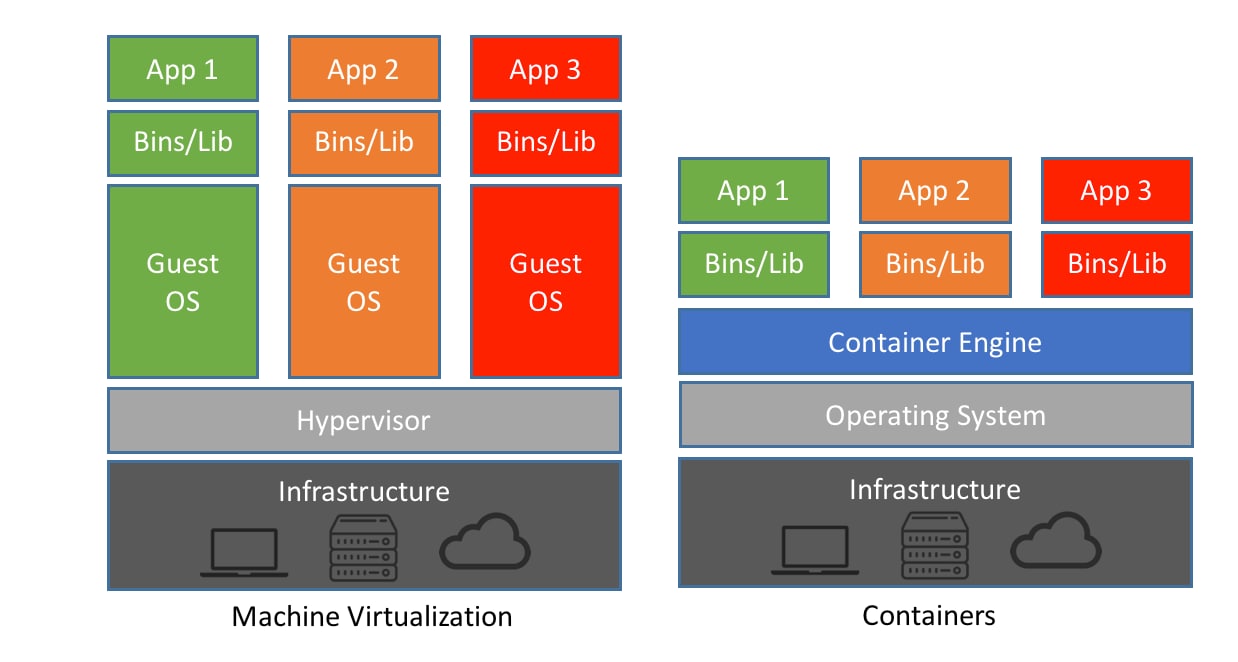
Virtualization is a technology that allows a software platform, called a hypervisor, to run processes that contain a fully emulated computing system. The hypervisor manages physical hardware resources for virtual machines (guests). Common hypervisors in Linux include Xen (bare-metal, Type 1), KVM (kernel-integrated, Type 1/2), and VirtualBox (Type 2, requires a host OS).
| Type | Examples | Pros | Cons | Ideal Use |
|---|---|---|---|---|
| Type 1 (Native) | KVM, Xen | High performance, direct hardware access | Complex setup | Production servers |
| Type 2 (Hosted) | VirtualBox, VMware | Easy desktop setup | Host OS overhead | Local testing on laptops |
On Ubuntu, install KVM with:
sudo apt update && sudo apt install -y qemu-kvm virt-manager libvirt-clients libvirt-daemon-system bridge-utils
sudo adduser $USER libvirt
sudo adduser $USER kvm
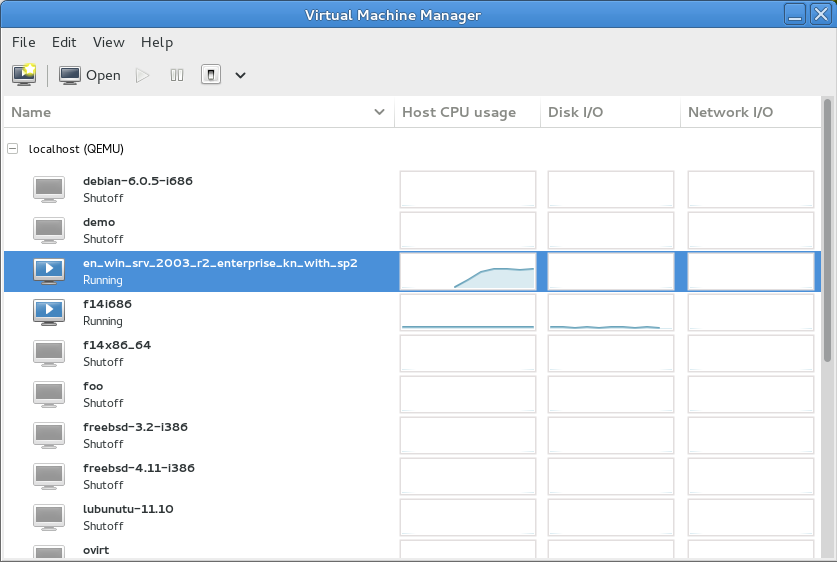
Launch the graphical interface with virt-manager.
Types of Virtual Machines
There are three main types: fully virtualized (requires CPU extensions like Intel VT-x), paravirtualized (uses special drivers for better performance), and hybrid (combination). For example, with KVM, create a basic VM:
# Install and configure KVM
sudo apt update && sudo apt install -y qemu-kvm virt-manager
sudo adduser $USER libvirt
sudo adduser $USER kvm

# Launch virt-manager (GUI)
virt-manager
In Virt-Manager, select an Ubuntu ISO, assign CPU/RAM, and boot via VNC. Test your app in an isolated VM without messing up the host environment.
Working with VM Templates
Templates are base VMs with OS and basic configs. Clone using virt-clone:
virt-clone --original my-vm --name my-vm-clone --file /var/lib/libvirt/images/my-vm-clone.qcow2Saves time in CI/CD. Remember to generate a new D-Bus Machine ID with dbus-uuidgen --ensure to avoid conflicts.
Deploying Virtual Machines in the Cloud
In clouds like AWS or Google Cloud, use base images (AMIs on AWS). Export your local VM as OVA and upload it. Checklist:
- Set up SSH keys.
- Use Packer to automate image creation.
- Test with AWS Lightsail free tier.
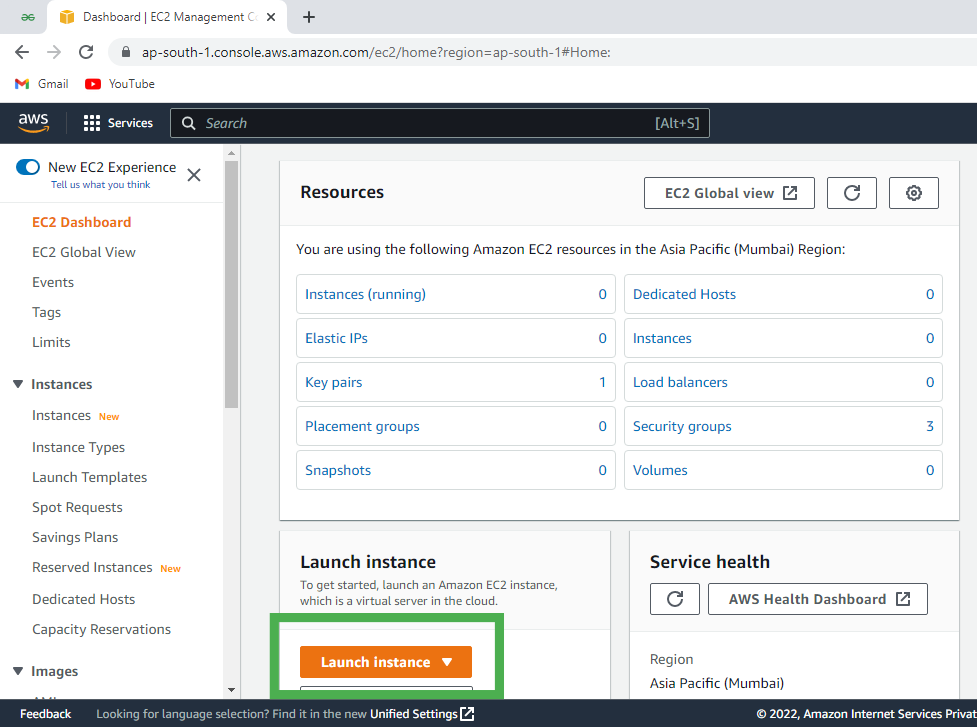
Example on AWS EC2: Launch an Ubuntu instance, assign resources, and connect via SSH.
Containers: The Lightweight Future of Virtualization
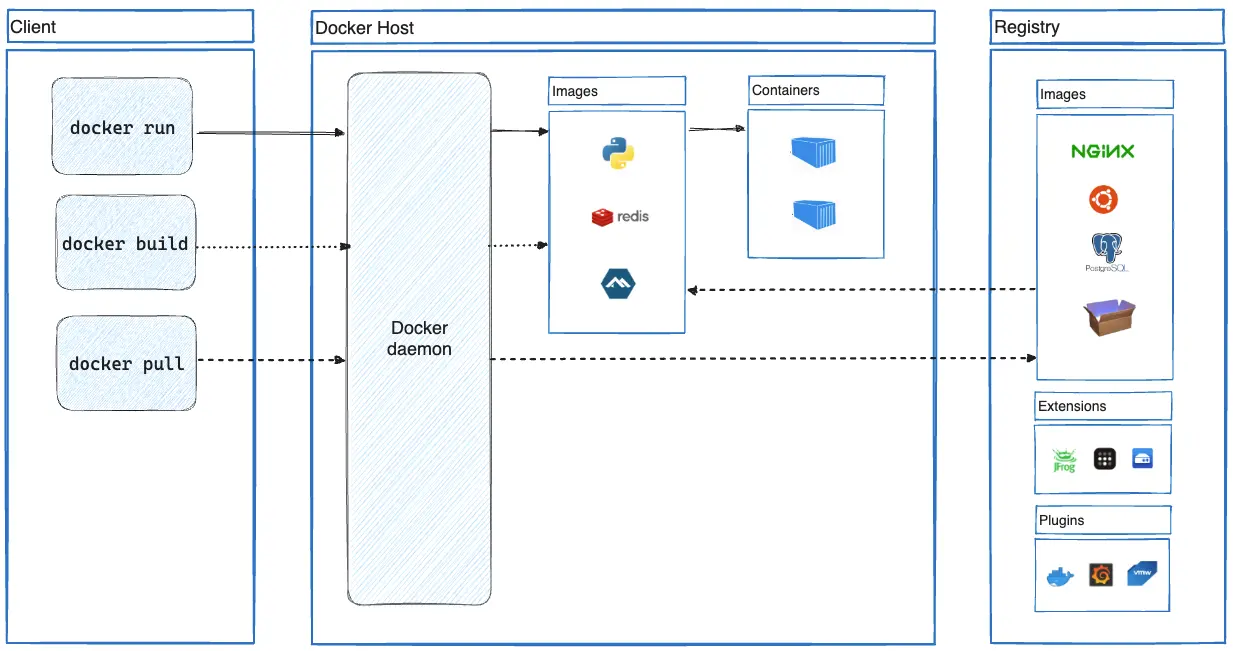
Containers (Docker, LXC) share the host kernel—lighter than VMs. Comparison: VMs (full OS, more isolation) vs. Containers (app-only, more efficient). Install Docker on Ubuntu:
curl -fsSL https://get.docker.com -o get-docker.sh
sudo sh get-docker.sh
sudo docker run hello-world
Containerize apps like Redis or Django for Kubernetes.
Practical Exercises and Summary
Guided: Create a VM with Ubuntu and run a container inside it. Exploratory: Compare performance using htop.
Summary: Virtualize to scale. Next step: Get LPIC-1 certified. Share your setup in the comments! Want more LPIC guides? Subscribe to Tech News.
⚠️ Common Errors in Linux Virtualization
When working with virtualization in Linux—whether KVM, VirtualBox, or Docker containers—it’s easy to fall into common traps that can ruin your setup. Based on real experiences from sysadmins and developers (including Docker and Stack Overflow forums), here are the most frequent errors, their symptoms, and how to avoid or fix them.
1. KVM not enabled or CPU lacking virtualization support
Symptoms: Messages such as Your CPU does not support KVM extensions or Virtualization support KVM is not enabled on host.
egrep -c '(vmx|svm)' /proc/cpuinfo
sudo modprobe kvm_intel  # or kvm_amd
2. User not added to libvirt or kvm groups
Symptoms: Errors like Permission denied or unable to connect to libvirt.
sudo adduser $USER libvirt
sudo adduser $USER kvm
newgrp libvirt
3. Networking issues: misconfigured bridges
VMs have no external connectivity.
virsh net-list --all
virsh net-start default
virsh net-autostart default
echo "net.ipv4.ip_forward=1" | sudo tee -a /etc/sysctl.conf
sudo sysctl -p
4. Resource overload
qemu-img create -f qcow2 my-vm.qcow2 20G
qemu-img convert -O qcow2 -c my-vm.qcow2 my-vm-compact.qcow2
5. Docker errors
sudo usermod -aG docker $USER
newgrp docker
sudo systemctl start docker
6. Failed migrations
ssh-keygen -t rsa
ssh-copy-id user@other-host
virsh migrate --live my-vm qemu+ssh://other-host/system